Most IQOS ILUMA i users in Dubai buy the device, start using it immediately, and never take the next step of connecting it to the app. On the surface, that seems fine. The device works, it heats, and your sessions run smoothly. But in reality, a large part of what you paid for is sitting unused.
Features like FlexBattery mode, FlexPuff personalisation, firmware updates, and warranty activation are all locked behind one simple connection. If your goal is just to insert a stick and start a session, the device already does that well. But if you want to actually experience everything the IQOS ILUMA i is capable of, the IQOS app is where the real control begins.
This guide walks you through the entire process step by step, from setting up your account to connecting your device on iPhone, Android, or desktop, and then understanding every feature available inside the app. It also covers firmware updates, warranty registration, and the most common issues users in the UAE face, along with clear fixes.
Quick Summary
The IQOS app in the UAE is not a traditional app you download. It works as a web app through your browser at iqos.com/ae.
There is no standalone app available in the App Store or Google Play for UAE users.
- iPhone users must use the free Bluefy browser
- Android users should use Google Chrome
- Desktop users need Chrome or Edge with a USB cable for full functionality
What Is the IQOS App and Why Should Dubai Users Care?
The IQOS app is a browser-based web application that connects your IQOS ILUMA i device to your iqos.com account. It is designed to give adult users more control over their device without needing to visit a store.
Through this connection, you can:
- Adjust Iluam device settings
- Install firmware updates
- Monitor usage
- Run diagnostics
- Activate warranty coverage
For users in the UAE, this system works differently from what many expect. There is no downloadable mobile app. Instead, everything runs inside your iqos.com account under the “My Devices” section.
This creates confusion for many first-time users in Dubai. They search the App Store, find nothing, or see apps that are restricted to other regions like Switzerland. The correct approach is to use the official web app.
Connecting your device is not just about convenience. It unlocks meaningful advantages:
- Advanced features like FlexBattery and FlexPuff
- Software updates that improve performance and lifespan
- Warranty activation and international coverage
- Automatic diagnostics for troubleshooting
- Usage tracking for better awareness
- Personalisation of vibration and display settings
Without connecting, you are essentially using a limited version of your device.
Quick Feature Availability Reference by Device
| Feature | ILUMA i PRIME | ILUMA i Standard | ILUMA i One | ILUMA / ILUMA PRIME |
|---|---|---|---|---|
| FlexBattery Mode | Yes | Yes | No | No |
| FlexPuff Toggle | Yes | Yes | Yes | No |
| Pause Mode | Yes | Yes | No | No |
| Touch Screen Control | Yes | Yes | No | No |
| Smart Gestures | No | No | No | Yes |
| AutoStart Toggle | Yes | Yes | Yes | Yes |
| Vibration Levels | Yes | Yes | Yes | Yes |
| LED Brightness | Yes | Yes | No | Yes |
| Usage Statistics | Yes | Yes | Yes | Yes |
| Firmware Updates | Yes | Yes | Yes | Yes |
IQOS Web App vs Mobile App: What UAE Users Need to Know
One of the most common questions in Dubai is why the IQOS app cannot be found on the iPhone App Store.
The reason is simple. Apple does not allow tobacco-related apps. This is an Apple policy, not something IQOS controls.
To work around this, IQOS uses a web-based app instead.
This web app works across devices:
- On iPhone through Bluefy browser
- On Android through Google Chrome
- On desktop through Chrome or Edge
Although there is an IQOS app on Google Play, it is region-restricted. UAE users may download it but often cannot connect properly. The web app is the only reliable method in the UAE.
Which IQOS Devices Work with the App in Dubai?
The IQOS web app supports all current devices sold in the UAE, along with some older models.
Devices like:
- IQOS ILUMA i PRIME
- IQOS ILUMA i Standard
- IQOS ILUMA i One
- IQOS ILUMA PRIME
- IQOS ILUMA Standard
- IQOS ILUMA One
All can connect and access different levels of features.
Note: The ILUMA i series offers the most advanced functionality, including FlexBattery and FlexPuff. Older models still support firmware updates, usage stats, and basic controls.
Before You Start: Setting Up Your IQOS Account
Before accessing the app, you need an active iqos.com UAE account.
If you already have one, you can move to the next step. If not, here is how to set it up properly.
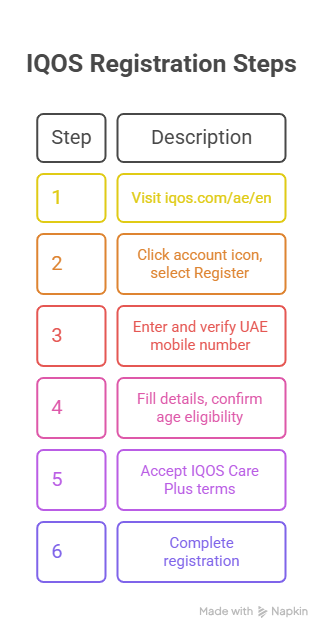
How to Create Your Account
- Go to iqos.com/ae/en
- Click the account icon and select Register
- Enter your UAE mobile number and verify it
- Fill in your details and confirm age eligibility
- Accept the IQOS Care Plus terms
- Complete registration
One important detail many users overlook is accepting the Care Plus terms. Skipping this step means missing out on extended warranty benefits.
Important for UAE Users: Your account must be registered under the UAE country setting. If you accidentally registered under a different country, you will need to contact IQOS UAE customer support to correct it. Future app access and warranty services are tied to your registered country.
How to Link Your IQOS Device
Before using the app, your device must be linked to your account.
You can do this in three ways:
- QR code scan
- Manual serial number entry
- Box code entry
Once linked, your device appears under “My Devices,” and you are ready to proceed.
How to Access the IQOS App in Dubai
The setup process depends on your device type. Each method has small but important differences.
iPhone Users: Bluefy Browser Method
iPhone users cannot use Safari or Chrome due to Bluetooth limitations.
The solution is the Bluefy browser.
Steps:
- Download Bluefy from the App Store
- Open iqos.com/ae/en inside Bluefy
- Log in to your account
- Go to My Devices
- Select your device and tap “Manage My Device.”
- Tap Continue
- Pair via Bluetooth
- Allow permissions and confirm connection
Pro Tip: Keep the Holder inside the Pocket Charger and reset Bluetooth before pairing for a smoother connection.
Pro Tip for iPhone Users in Dubai
Before pairing, make sure the Holder is sitting inside the Pocket Charger. Go into your iPhone Bluetooth settings and remove any previous IQOS pairings you might have saved. Then turn your IQOS device off and back on by holding the pocket charger button for 4 seconds. This refreshes its Bluetooth signal and makes the pairing process much smoother.
Android Users: Google Chrome Method
Android users have a simpler process.
Steps:
- Open Google Chrome
- Go to iqos.com/ae/en
- Log in
- Navigate to My Devices
- Select your device
- Tap Manage My Device
- Pair via Bluetooth
Note: Make sure you are using Chrome. Other browsers will not work properly.
Desktop Users: USB Connection Method
Desktop connection is essential for firmware updates, especially for the Holder.
Steps:
- Open Chrome or Edge
- Log in to iqos.com
- Go to My Devices
- Select your device
- Choose Connect via USB
- Plug in your device
- Confirm connection
This is the only way to fully update the Holder firmware.
Important Note for UAE Users
Some users in Dubai find that the Manage My Device option does not appear at all, even after logging in and linking their device. This happens when your iqos.com UAE profile has not been verified in person yet. You will need to visit any IQOS UAE store once to have staff activate your profile. After that, you can do everything from home. Store locations include the IQOS Boutique at Dubai Mall, Mall of the Emirates, JBR Walk, and Abu Dhabi branches.
IQOS App Features: What You Can Control
Once connected, the app gives you full control over how your device behaves.
FlexBattery
Available on ILUMA i PRIME and ILUMA i Standard.
You can choose between:
- Performance Mode for multiple sessions
- Eco Mode for longer battery lifespan
Eco Mode can extend battery life significantly over time.
FlexPuff
- FlexPuff adjusts your session dynamically and can add up to 4 extra puffs.
- It works automatically based on your usage pattern and ensures better use of each stick.
Vibration Settings
- You can adjust vibration intensity.
- This is useful for discreet usage in quiet environments.
LED Brightness
- Control the screen and light brightness depending on your surroundings.
Smart Gestures
- Available on older ILUMA models.
- Includes tilt and double-tap controls for quick interaction.
AutoStart
- Automatically begins heating for heat-not-burn technology when a Terea stick is inserted.
- You can disable it if you prefer manual control.
Usage Statistics
- Track your daily and weekly sessions.
- This helps you understand your usage habits over time.
Firmware Updates: Why They Matter
Firmware updates improve:
- Heating performance
- Battery efficiency
- Device stability
There are two components to update:
- Pocket Charger (via Bluetooth)
- Holder (via USB on desktop)
Many users skip updating the Holder, which means they miss performance improvements.
Warranty and Care Plus Protection
Connecting your device also activates warranty coverage.
Benefits include:
- 1-year manufacturer warranty
- Care Plus extended support
- International coverage in 90+ countries
- Replacement options
Registration must be done within 30 days for full benefits.
Are you a beginner? Then read this flavor guide: How to Choose the Right TEREA Flavor for Your IQOS ILUMA in Dubai
Troubleshooting Common Issues
Most issues are simple to fix.
Common problems include:
- Missing “Manage My Device” option
- Bluetooth connection failures
- Unsupported browsers
- Firmware update issues
Typical fixes involve:
- Using the correct browser
- Resetting Bluetooth
- Linking the device properly
- Visiting an IQOS store for profile activation
If Your Device Still Won’t Connect
Try:
- Removing old Bluetooth pairings
- Restarting the device
- Ensuring only one device is active
- Closing background apps
If needed, visit an IQOS store for direct support.
Final Thoughts
Setting up the IQOS app takes less than 10 minutes, but it completely changes how your device performs. You move from basic usage to full control. From a simple heating device to a personalised system tailored to your routine.
For users in Dubai and across the UAE, the extra step of registering your device and activating your account is worth it. It costs nothing, but ensures your device is protected, updated, and performing at its best wherever you are.
If you are already using an IQOS ILUMA i, you can buy from the Terea Dubai online shop. Connecting it to the app is not an upgrade. It is the complete experience you originally paid for.
Frequently Asked Questions
Is the IQOS app free to use in Dubai?
Yes. The IQOS web app and account are completely free. Only devices and TEREA sticks are paid. iPhone users can use the free Bluefy browser.
Why can’t I find the IQOS app in the App Store?
Apple blocks tobacco apps. Use the IQOS web app via the Bluefy browser to access all features.
Do I need the app to use IQOS ILUMA i?
No. The device works out of the box. The app is optional for extra features like battery modes, updates, and warranty support.
Can I link multiple IQOS devices to one account?
Yes. You can manage multiple devices under one account. Just keep only one device active during pairing.
Why does Eco Mode allow only one session?
That’s normal. Eco Mode limits sessions to extend battery life. Switch to Performance Mode for more sessions.
Why is “Manage My Device” not showing?
Your UAE profile may not be verified. Visit an IQOS store once to activate it, then the option will appear.
Do firmware updates affect warranty?
No. Official updates are safe and recommended. Warranty is only affected by misuse or unofficial modifications.
Can I use the IQOS app outside the UAE?
Yes. You can access your account anywhere with internet. International support is available in many countries.
