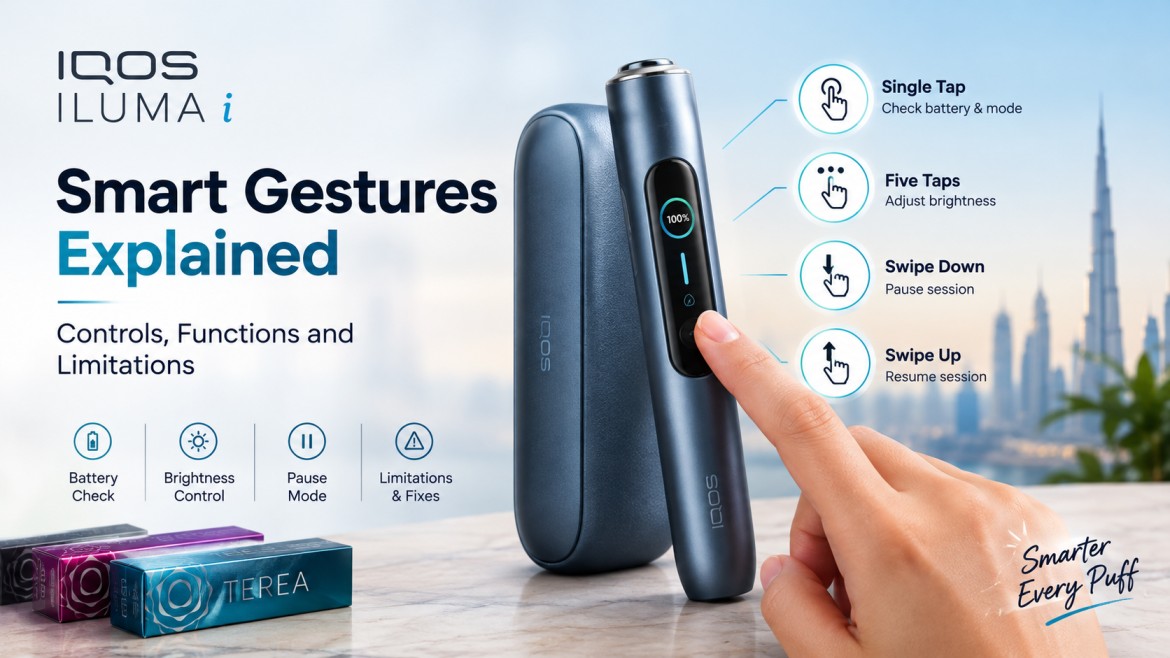
Four touches control the screen on your IQOS ILUMA i: a single tap, five quick taps, a swipe down and a swipe up. Between them, they let you check your battery, adjust screen brightness, pause a session and pick it back up again. That is the whole gesture set, and it takes about two minutes to learn.
What takes longer is understanding the rules around it. Pause Mode only works in certain conditions, a slow swipe is ignored, and some modes switch the feature off entirely. This guide covers what each gesture does, where the limits sit, and how to fix the usual problems, whether you are opening a new IQOS ILUMA i for the first time or upgrading from an older model.
What Are Smart Gestures on the ILUMA i?
Smart gestures is the name most people use for the touch controls on the holder’s screen. IQOS itself simply calls it the touch screen, and the controls sit alongside app features such as FlexPuff and FlexBattery. We use the popular term here because it is what UAE buyers search for, but every detail below follows IQOS’s own guidance.
The idea is simple. Older holders spoke through light signals and vibrations. The ILUMA i adds a screen that shows its mode, battery and session progress, and lets you answer with a touch.
Which Models Have Touch Controls?
IQOS’s official material places the touch screen on the ILUMA i PRIME and the ILUMA i. That makes the IQOS ILUMA i PRIME and the IQOS ILUMA i Standard the safest choices if gestures matter to you.
For the IQOS ILUMA i ONE, check the specification before buying, since IQOS does not list which gestures apply to every model. If you are coming from the older ILUMA generation, our ILUMA i PRIME vs ILUMA PRIME comparison shows what changes in daily use.
Every Gesture and What It Does
| Gesture | How you do it | What happens |
|---|---|---|
| Single tap | One light touch while the holder is idle | Screen wakes and shows mode and battery status |
| Five quick taps | Five fast touches in a row | Changes screen brightness |
| Swipe down | One full, quick swipe from top to bottom | Starts Pause Mode, with a short vibration to confirm |
| Swipe up | One full, quick swipe from bottom to top | Ends the pause and preheats again, or starts preheating when idle |
The single tap works like glancing at a watch. Many experienced users do it before leaving the house, and beginners like that it answers “how much battery is left?” without opening the app.
The five-tap brightness change matters more than it sounds. Stand outside at midday in Dubai and the icons can wash out. Five quick taps fixes it in seconds, and the app offers the same setting if you prefer menus. Our IQOS app setup guide shows how to connect the two.
Swipe down is the headline gesture. It pauses your session, the holder vibrates, and a pause symbol appears. The light ring then dims step by step like a countdown. A pause lasts up to about eight minutes, after which the holder switches itself off.
Swipe up resumes the session. The holder needs roughly twenty seconds to heat again, then a vibration and light signal tell you it is ready.
When Pause Mode Earns Its Place
Pause Mode sounds minor until you need it. People use it most when:
- A conversation interrupts the session
- They walk between indoor and outdoor spaces
- A phone call or message comes in
- Their day is full of short breaks and they want to finish one stick across several moments
The goal is not to stretch a stick forever. It is to let the session fit around your day.
The Limitations Worth Knowing Before You Buy
Most frustration with gestures comes from rules people never heard about. IQOS is quite specific here.
- Pause needs Performance mode. In Eco mode, Pause is not available.
- The window is short. Pause is offered early in a session, within the first three minutes or the first few puffs. After that, the option closes.
- One pause per back-to-back pair. Performance mode allows two sessions in a row, but only one of them can be paused.
- FlexPuff stays off during a pause. The extra puffs you get from lighter draws do not apply to a paused session.
- Swipes must be quick and complete. A swipe slower than about half a second, or one that stops short of the full screen length, is not registered.
- No customization. IQOS does not publish any option to disable or reassign individual gestures. Brightness is the main touch setting you can change.
Gestures vs the IQOS App
The screen and the app split the work. Gestures handle in-the-moment actions: status, pause, resume and brightness. The app handles settings you choose once, such as FlexBattery mode, FlexPuff and firmware updates. Even Pause Mode follows this split, since the app can switch it on or off but the pause itself is always a swipe. For the full list of app features, read our guide to what the ILUMA i Bluetooth features actually do.
Your First Five Minutes: A Beginner Routine
- Fully charge the pocket charger, then place the holder inside.
- Tap once and read the mode and battery.
- Insert a stick and start a session.
- Early in the session, swipe down across the whole screen and feel for the vibration.
- Swipe up and let the holder preheat.
- Try five quick taps and watch the brightness change.
Doing this once, on purpose, builds the muscle memory you will want later.
Tips for Experienced Users
- Swipe from edge to edge, like unlocking a phone.
- Decide on a pause in the first minutes, not near the end.
- Pick your mode with intent: Performance when pausing matters, Eco when you will be away from the charger for long.
- Wipe the screen with a dry, soft cloth, since smudges can dull touch response.
- Watch the light ring to see how much of a session remains.
Gestures Not Responding? Quick Fixes
- Check the swipe. Make it faster and cover the whole screen.
- Check the mode and timing. Confirm Performance mode and that you are still early in the session.
- Check the charge. A very low battery can dull responsiveness.
- Clean the screen. Dust, oil and moisture interfere with touch.
- Update the firmware. App updates over Bluetooth are known to tidy up touch glitches.
- Try a reset. Our ILUMA i reset guide for UAE users shows the steps.
- Rule out a heating fault. If the screen responds but the holder will not heat, see our ILUMA i not heating fix guide.
If nothing helps, contact the seller or IQOS support for a proper check.
Common Myths
“I can pause any time.” The window is limited and tied to Performance mode.
“Swiping harder helps.” Speed and full length matter, pressure does not.
“Gestures replace the app.” They handle quick actions, while the app handles settings.
Keeping the Screen Responsive
Wipe the screen now and then, keep the holder away from loose keys and coins, and never leave it in a hot car. A simple routine is outlined in our guide on how to care for your IQOS ILUMA i PRIME.
Matching Sticks and Style to Your Device
Gestures change how you control a session, while the taste still comes from the stick. If you are still finding your preference, TEREA Balanced Regular is an easy starting point, and you can browse more TEREA sticks once you know whether you lean toward tobacco, menthol or fruit. For looks, the ILUMA i PRIME in Midnight Black suits anyone who likes a low-key finish.
Why Buy From TEREA Dubai
A touch-screen holder is a bigger purchase than an accessory, so the seller matters. Everything at All Heets Dubai is 100% authentic, and delivery runs on UAE timing:
- 1 to 2 hours in Dubai, Sharjah and Ajman
- 12-hour courier across the rest of the UAE
- Cash, card or bank transfer
- Helpful support on modes and compatibility before you buy
When you are ready, order at TEREA Dubai and your holder and sticks will be on the way within hours.
Final Thoughts
Smart gestures are not flashy, and that is why they work. A tap to check, a swipe to pause, a swipe to resume and five taps for brightness cover nearly everything you will want from the screen. Learn the limits once, keep the screen clean, and the holder will feel built around your routine.
Frequently Asked Questions
What are smart gestures on the IQOS ILUMA i?
They are the touch actions on the holder’s screen: a tap, five quick taps, a swipe down and a swipe up. They check status, change brightness, pause a session and resume it.
How do I pause my ILUMA i?
Swipe down quickly across the entire screen. The holder vibrates and shows a pause symbol. Swipe up to resume.
How long can a pause last?
Up to roughly eight minutes. After that, the holder switches off.
Why is Pause Mode not available?
Usually the holder is in Eco mode, the early window has passed, or a pause was already used in your back-to-back sessions.
Can I turn gestures off?
IQOS does not publish an option to disable or reassign them. Brightness is the main touch setting you can adjust.
Do I need the IQOS app?
No. Gestures work directly on the holder. The app adds settings like FlexBattery and firmware updates.
Why does my swipe not register?
It is probably too slow or too short. Swipe quickly across the full screen, using your free hand’s index finger if needed.
Do all ILUMA i models have touch controls?
IQOS places the touch screen on the ILUMA i PRIME and ILUMA i. Check the specification for any other model before buying.
Nicotine disclaimer: This product contains nicotine, which is an addictive chemical. It is intended for adult smokers aged 18 and over only. It is not a smoking cessation product and is not risk free. Keep out of reach of children and non-smokers.
